imgui_bundle.imgui_terminal (Python only) embeds a terminal emulator in your ImGui application: a real shell rendered as an ImGui widget, with colors, scrollback, text selection, and job control.
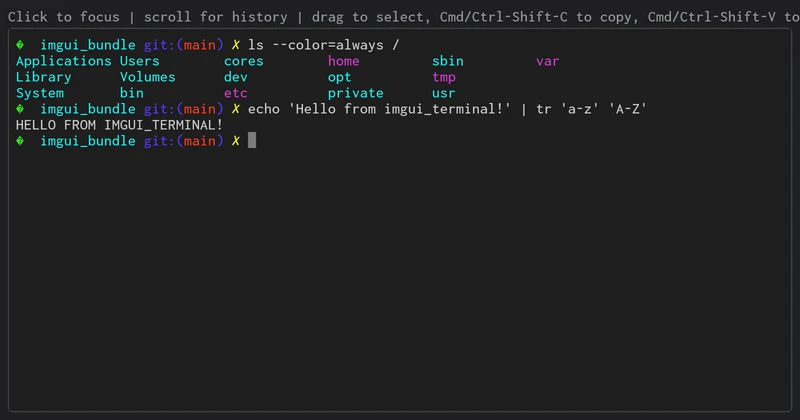
A zsh shell running inside an ImGui child window.
Install
pip install "imgui-bundle[terminal]" # adds the pyte VT100 emulatorQuick start
from imgui_bundle import hello_imgui, imgui_ctx, immapp
from imgui_bundle.imgui_terminal import TerminalView, LocalShellTransport

mono_font = None
view = TerminalView()
LocalShellTransport().start(view)  # spawns $SHELL behind a pty (POSIX)


def load_fonts():
    global mono_font
    mono_font = hello_imgui.load_font("fonts/Inconsolata-Medium.ttf", 16.0)


def gui():
    with imgui_ctx.push_font(mono_font, 0.0):  # the widget uses the active font
        view.render_in_child("terminal")


params = hello_imgui.RunnerParams()
params.callbacks.load_additional_fonts = load_fonts
params.callbacks.show_gui = gui
immapp.run(params)
Full demo: demo
Architecture: widget vs transport
The module separates the widget from the byte source:
keyboard -> ImGui -> transport -> shell/remote -> view.feed -> pyte -> ImGui draws itTerminalViewowns a pyte VT100 screen, draws it, and translates keyboard/mouse input. It knows nothing about where bytes come from: push output in withview.feed(bytes), receive keystrokes via theview.on_inputcallback.feed()may be called from any thread, and asks for the next frames (hello_imgui.request_refresh()): the app does not idle while output streams in.A transport produces and consumes those bytes.
LocalShellTransportruns a local shell behind a pseudo-terminal (macOS / Linux). Any object withstart(view)/stop()works (TerminalTransportprotocol);start()takes ownership ofview.on_input/view.on_resize.
Remote shell (SSH, websocket, robot companion computer...)
The same widget drives a remote shell: wire the callbacks to your channel and feed incoming bytes.
view = TerminalView()
view.on_input  = lambda data: channel.send(data)          # keystrokes -> remote
view.on_resize = lambda cols, rows: channel.resize(cols, rows)
# in a background reader:  for chunk in channel: view.feed(chunk)
When your reader thread changes what the GUI shows (connected, closed, an error), it calls hello_imgui.request_refresh(), so that the app shows it at once, even while it idles.
Runnable remote demos (in demos_python/demos_terminal/):
demo
_terminal _ssh .py — over an SSH channel (paramiko) demo
_terminal _websocket .py + pty _bridge _server .py — over a websocket to a host-side shell bridge
This websocket path is also how a Pyodide / browser build would work: there is no local pty in the browser, but the widget itself is pure Python and drives a remote shell over a websocket.
Features
ANSI / 256-color / truecolor rendering; interactive programs work (
vim,htop,tmux, shells with completion)Scrollback with a native ImGui scrollbar; follows live output until you scroll up, typing snaps back
Full keyboard: F-keys, Ctrl combos incl. job control (Ctrl-C / Ctrl-Z), Alt as Meta, Shift-Tab, and modifier-encoded arrows/Home/End (Ctrl/Alt-Left/Right for word jumps)
Text selection: drag, double-click a word, triple-click a line, or click + shift-click across scrollback; copy with Cmd-C/V (macOS) or Ctrl-Shift-C/V, paste with right-click
ANSI colors plus bold and underline
Colors themable via
TerminalTheme; the program-set window title is available asview.title
Limitations
pyte is a solid VT100 emulator, not a complete xterm. Known gaps: no alternate screen buffer (full-screen apps leave their frames in scrollback), no application cursor keys mode, no bracketed paste, no mouse reporting to programs, and double-width (CJK/emoji) glyphs may overlap. Glyphs missing from your font render as replacement boxes (ImGui does no OS font fallback); use a well-covered monospace font.
The local-shell transport is POSIX only; on Windows, adapt it with pywinpty (ConPTY) or use a remote transport.